

Silverbullet — One-Click Install
SilverBullet is a creative space where you collect, create and expand your personal knowledge, while also letting you constantly evolve the tools you use to do so.
Why install Silverbullet with Web.Casa?
No manual Docker Compose needed. Web.Casa configures and starts everything.
Caddy auto-provisions SSL certificates. Reverse proxy works out of the box.
Monitoring, backups, updates, logs — manage all apps from one panel.
How to Install
Install Web.Casa first, then one-click install this app from the App Store.
SilverBullet
SilverBullet aims to be your workshop for the mind: a creative space where you collect, create and expand your personal knowledge, while also letting you constantly evolve the tools you use to do so.
While you can use SilverBullet as a simple note taking application that stores notes in plain markdown files on disk, it becomes truly powerful in the hands of more technical power users. By leveraging metadata annotations, its Objects infrastructure, Live Queries and Live Templates, SilverBullet becomes a powerful end-user programming tool, enabling you to quickly develop various types of ad-hoc knowledge applications. SilverBullet is implemented as an open-source, self-hosted, offline-capable web application.
You’ve been told there is no such thing as a silver bullet. You were told wrong.
Features
SilverBullet...
- Runs in any modern browser (including on mobile) as a PWA in two Client Modes (online and synced mode), where the synced mode enables 100% offline operation, keeping a copy of content in the browser, syncing back to the server when a network connection is available.
- Provides an enjoyable markdown writing experience with a clean UI, rendering text using Live Preview, further reducing visual noise while still providing direct access to the underlying markdown syntax.
- Supports wiki-style page linking using the
[[page link]]syntax. Incoming links are indexed and appear as “Linked Mentions” at the bottom of the pages linked to thereby providing bi-directional linking. - Optimized for keyboard-based operation:
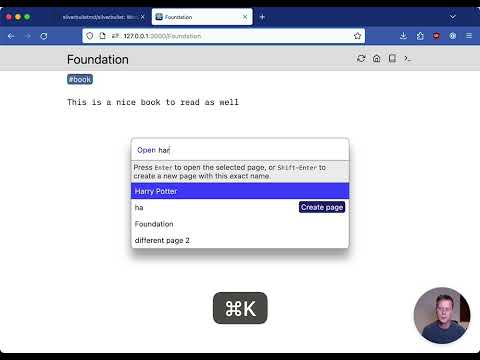
- Quickly navigate between pages using the page switcher (triggered with
Cmd-kon Mac orCtrl-kon Linux and Windows). - Run commands via their keyboard shortcuts or the command palette (triggered with
Cmd-/orCtrl-/on Linux and Windows). - Use Slash Commands to perform common text editing operations.
- Quickly navigate between pages using the page switcher (triggered with
- Provides a platform for end-user programming through its support for Objects, Live Queries and Live Templates.
- Robust extension mechanism using plugs.
- Self-hosted: you own your data. All content is stored as plain files in a folder on disk. Back up, sync, edit, publish, script with any additional tools you like.
- SilverBullet is open source, MIT licensed software.
FAQ
Can I install Silverbullet on Web.Casa?
Yes, Silverbullet is available in the Web.Casa App Store. You can install it with one click from the Web.Casa panel — no need to manually write Docker Compose files or configure reverse proxies.
How do I install Silverbullet on Web.Casa?
First install Web.Casa with curl -fsSL https://get.web.casa | bash, then search for "Silverbullet" in the App Store and click install. Web.Casa automatically configures the Docker container, assigns ports, and sets up a Caddy reverse proxy.
What is the default port for Silverbullet on Web.Casa?
The default port for Silverbullet on Web.Casa is 8214. You can bind it to a custom domain through Web.Casa's Caddy reverse proxy, which automatically provisions HTTPS certificates.
Does Silverbullet get automatic HTTPS after installation?
Yes. Web.Casa is built on Caddy, so after installing the app, simply bind a domain and Caddy will automatically provision and renew SSL certificates via Let's Encrypt — no manual configuration needed.
How do I back up Silverbullet data?
Web.Casa has a built-in backup plugin that supports automatic backups of Silverbullet data to local storage, S3, WebDAV, or SFTP. You can configure scheduled snapshots and retention policies to keep your data safe.
Related Apps

Adguard Home Sync
Synchronize AdGuard Home config to replicas

AFFiNE
AFFiNE is a workspace with fully merged docs, whiteboards and databases.

Atuin Server
Magical Shell History

Baïkal
Calendar + Contacts server

Barrage
Minimal Deluge WebUI with full mobile support

Bazarr
A companion application to Sonarr and Radarr that manages and downloads subtitles