

Homarr — One-Click Install
Homarr is a simple and lightweight homepage for your server, that helps you easily access all of your services in one place.
Why install Homarr with Web.Casa?
No manual Docker Compose needed. Web.Casa configures and starts everything.
Caddy auto-provisions SSL certificates. Reverse proxy works out of the box.
Monitoring, backups, updates, logs — manage all apps from one panel.
How to Install
Install Web.Casa first, then one-click install this app from the App Store.

Install 💻 • Translations 🈺 • Discord 👋
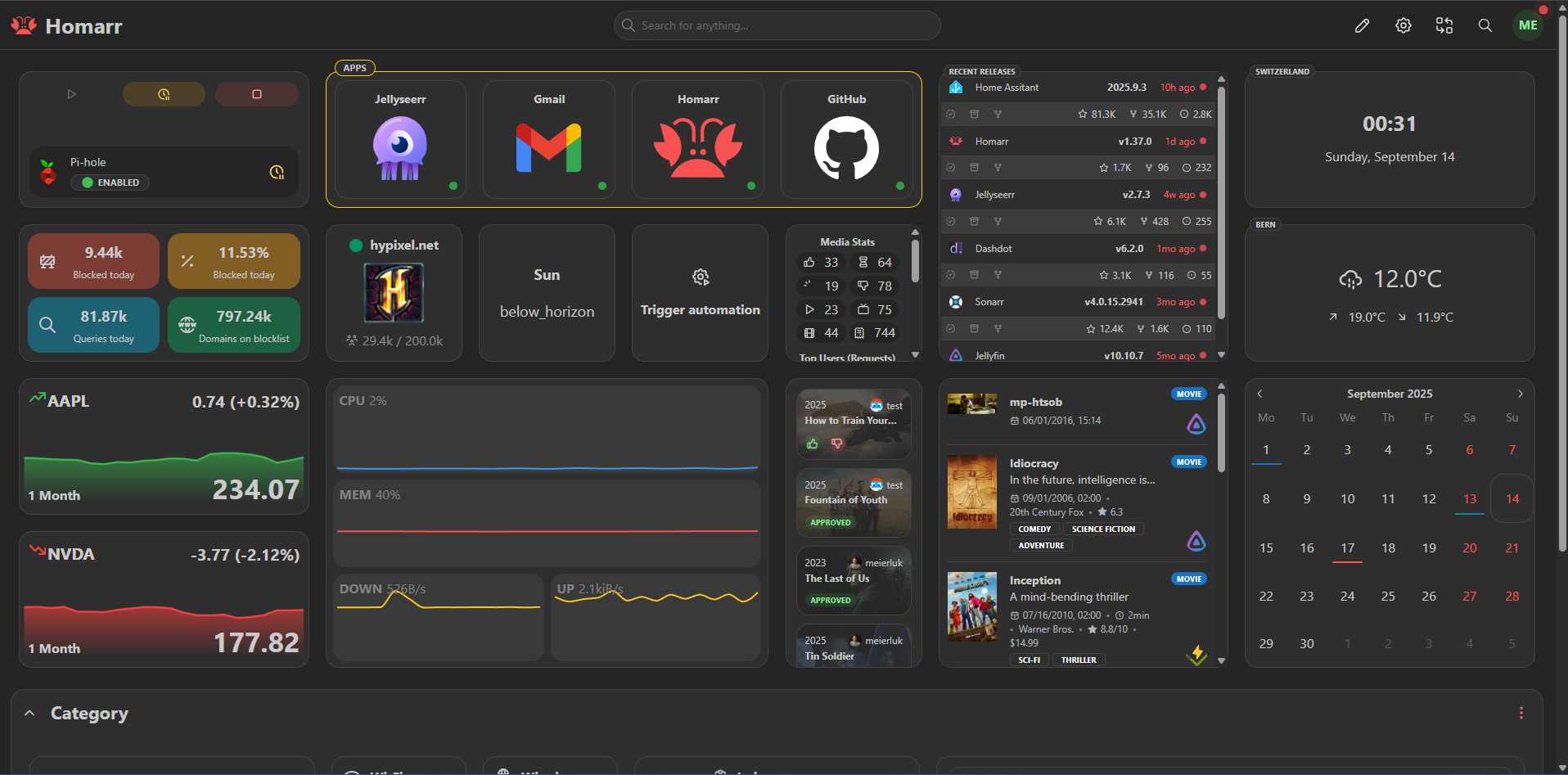

- 🖌️ Highly customizable with an extensive drag and drop grid system
- ✨ Integrates seamlessly with your favorite self-hosted applications
- 📌 Easy and fast app management - no YAML involved
- 👤 Detailed and easy to use user management with permissions and groups
- 👥 Support for single sign on via OIDC / LDAP
- 🙊 Safe encryption using BCrypt and AES-256-CBC for your valuable data
- 🕔 Realtime widget updates using WebSockets, tRPC and Redis
- 🔍 Search through thousands of data points in supported integrations or your data in Homarr using the fast built-in search
- 🦞 Icon picker with over 11K icons
- 🚀 Compatible with any major consumer hardware (x86, Raspberry Pi, old laptops, ...) and most OS (Windows, Linux, TrueNAS, Unraid)
- 🖥️ Extensive Kubernetes support with Helm for efficient scaling & high reliability



































Help the project
Homarr is a free-to-use open source project maintained by volunteers and developers from all over the world.
We publish under the Apache License 2.0 license which allows commercial usage.
We invest multiple hours daily in providing support, developing Homarr, integrating to third party software and more.
We also pay for licensing and server hosting fees.
Please consider helping us cover these costs to enable the future development of Homarr. Thank you!
You can also support us by helping with translating the entire project to as many languages as possible or contributing directly to the code or documentation. Please read our Contribution Guidelines. All contributions, regardless of their size or scope, are welcome and highly appreciated! Thank you ❤️
Click here to sponsor Homarr at OpenCollective
FAQ
Can I install Homarr on Web.Casa?
Yes, Homarr is available in the Web.Casa App Store. You can install it with one click from the Web.Casa panel — no need to manually write Docker Compose files or configure reverse proxies.
How do I install Homarr on Web.Casa?
First install Web.Casa with curl -fsSL https://get.web.casa | bash, then search for "Homarr" in the App Store and click install. Web.Casa automatically configures the Docker container, assigns ports, and sets up a Caddy reverse proxy.
What is the default port for Homarr on Web.Casa?
The default port for Homarr on Web.Casa is 8102. You can bind it to a custom domain through Web.Casa's Caddy reverse proxy, which automatically provisions HTTPS certificates.
Does Homarr get automatic HTTPS after installation?
Yes. Web.Casa is built on Caddy, so after installing the app, simply bind a domain and Caddy will automatically provision and renew SSL certificates via Let's Encrypt — no manual configuration needed.
How do I back up Homarr data?
Web.Casa has a built-in backup plugin that supports automatic backups of Homarr data to local storage, S3, WebDAV, or SFTP. You can configure scheduled snapshots and retention policies to keep your data safe.
Related Apps

Adguard Home Sync
Synchronize AdGuard Home config to replicas

AFFiNE
AFFiNE is a workspace with fully merged docs, whiteboards and databases.

Atuin Server
Magical Shell History

Baïkal
Calendar + Contacts server

Barrage
Minimal Deluge WebUI with full mobile support

Bazarr
A companion application to Sonarr and Radarr that manages and downloads subtitles